A garden does not have to be perfectly designed to be worth photographing. Sometimes the best pictures are the ones taken while you are watering plants, noticing a butterfly on a flower, watching sunlight move across a flower bed, or discovering that a plant has finally started to bloom. These small moments are what make a garden personal.
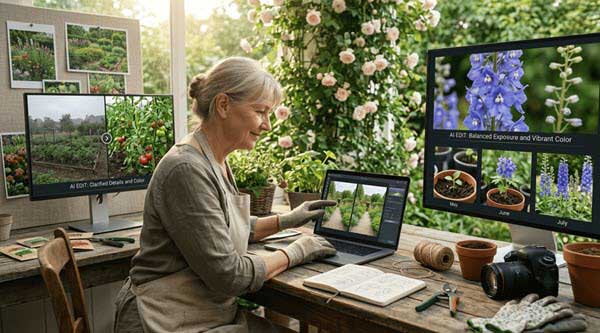
The trouble is that everyday garden photos do not always look the way the moment felt. A person walking through the background can distract from a butterfly. A cloudy sky can make a colourful border look dull. A garden may look beautiful in person but feel flat in a photograph because the lighting was not quite right.
An AI Image Editor available within Higgsfield can give gardeners another way to work with those photographs for creative editing and visual refinement. Instead of replacing the original moment, it can help clean up distractions, improve presentation, adjust elements, or explore a different visual treatment. That makes photo editing less about creating a perfect garden and more about telling the story behind the garden in a clearer way.
Why Garden Photos Tell More Than You Might Expect
A garden changes constantly. Flowers open and fade, butterflies arrive and disappear, vegetables become ready to harvest, and the same corner can look completely different from one season to another. Taking photographs gives gardeners a simple record of those changes.
You might photograph a newly planted flower bed in spring and return to the same spot in summer. You might capture the first monarch butterfly of the season or document how a climbing plant has taken over a trellis. These pictures become part of the garden’s history.
An AI Image Editor can be useful when you want to make those photographs easier to share without losing the character of the original scene.
The goal does not have to be dramatic editing. Often, a small adjustment is enough. Removing an unwanted object, improving the framing, correcting an uneven exposure, or making a distracting background less noticeable can help the viewer focus on what you originally wanted to show.
Start With the Photograph You Already Have
You do not need a professional camera to create useful garden photographs. A phone is often enough because it is usually nearby when something interesting happens. The most important part is noticing the moment and taking the picture.
Before editing, look at the photograph carefully.
Ask yourself:
- What caught my attention when I took this picture?
- Is the main subject easy to see?
- Is something distracting from it?
- Does the lighting match the mood of the garden?
- Would a different crop make the photograph stronger?
An AI Image Editor becomes much more useful when you already know what you want to improve.
Rather than asking the technology to make the whole photograph “better,” give it a specific job. A clear request such as removing an unwanted object or changing a particular part of the background gives you more control over the final result. That approach also helps keep the photograph believable.
Remove the Little Distractions
Garden photographs often contain things that were invisible to you when you pressed the shutter. A hose may be lying across the lawn. A garden chair may be sitting behind a flower. A plastic pot may appear in the corner. A fence, sign, or piece of equipment may pull attention away from the subject. These details are normal parts of gardening, but they can interrupt a photograph.
An AI Image Editor can help remove certain unwanted elements and reconstruct the surrounding area so the picture feels less cluttered.
For example, imagine photographing a butterfly resting on a flower. The butterfly is exactly where you want it, but a bright garden tool is sitting behind it. Removing that distraction can make the original subject much easier to notice. The important thing is restraint. A garden does not need to look artificial simply because it has been edited.
Give Flowers the Attention They Deserve
Flowers are naturally photogenic, but getting them to look good in a photograph can be surprisingly difficult. Bright sunlight can wash out colours. Shadows can hide petals. A flower may look vivid to your eyes but appear less impressive on a phone screen. An AI Image Editor can help you experiment with adjustments while keeping the photograph recognizable.
You might want to improve the overall balance of light, make the subject stand out slightly, or prepare the photograph for a particular format.
This can be especially helpful when you are creating a collection of garden photographs. Instead of each picture having a completely different appearance, you can work toward a more consistent look.
That consistency can make a seasonal garden journal, social media series, or personal photo collection feel much more connected.
Make Butterfly Moments Easier to Share
Butterflies are among those garden creatures that don’t need to wait for photographers. You could spend hours watching a single one, and then just a few minutes to snap a photo before it disappears.
The resultant image could be clear of the butterfly, but may also contain distracting foliage or fencing flowers. AI Image Editor can assist in enhancing the photo after the time has gone by.
It is possible to crop the image or remove any distractions or even make a subtle change to draw attention to the butterfly. This is particularly helpful for gardeners who love to document the various species that visit their backyards.
Gardens With Wings has long associated gardening with observation of butterflies and identification, habitat and photography, which makes photography a natural aspect of the topic. Its articles also inspire readers to be aware of the specifics of butterflies and the places that draw butterflies. The photo is your document of the event. Editing only helps convey the event more clearly.
Turn a Collection of Photos Into a Garden Story
One photograph can show a flower. Several photographs can tell a story. Consider photographing a garden renovation from beginning to end. The first image could show an empty space. The next might capture planting day. Later photographs could show new growth, visiting pollinators and the finished garden. An AI Image Editor can help prepare those images so they work together.
You might use similar crops, clean up repeated distractions, or make small adjustments so the photographs feel consistent when viewed side by side.
This approach works particularly well for gardeners who share their projects online. Instead of posting a random collection of pictures, you can create a visual sequence that answers a simple question:
What changed?
That question gives the photographs a reason to exist beyond simply showing something pretty.
Experiment With Different Garden Perspectives
Sometimes the problem is not the garden. It is the photograph. You may have taken the picture from standing height when a lower angle would have made the plants feel more impressive. Perhaps the original frame included too much empty sky. Maybe the subject was pushed too far toward one side. Modern editing tools can give you more opportunities to explore those possibilities after taking the photograph.
Higgsfield’s current editing workflow includes tools for cropping and expanding images, changing camera perspective, adjusting lighting and making other image level changes.
That means an AI Image Editor can become useful not only for fixing mistakes but also for exploring creative alternatives.
There is a difference, though, between improving a photograph and changing what the garden actually looked like. Keeping that distinction in mind helps maintain trust, especially when the image is being used to document plants, wildlife, or garden progress.
Create Garden Inspiration Without Pretending It Is a Photograph
Gardeners often imagine possibilities before they make changes. What would this corner look like with more colour? Would a different planting arrangement work? What might the space feel like if the seating area were moved?
AI assisted editing can help explore those questions visually. An AI Image Editor can be used to experiment with an existing garden photograph rather than starting with a completely blank canvas.
That can make an idea easier to discuss with family members or friends. For example, you could take a photograph of a plain patio and explore a few possible visual directions. The resulting images should be treated as concepts rather than promises. Plants will grow differently, light changes throughout the day and real materials may not look exactly like their digital versions. Still, seeing an idea can make planning much easier.
Keep the Garden Looking Like Your Garden
One of the biggest mistakes with photo editing is going too far. If every flower becomes brighter, every sky becomes dramatic, and every background disappears, the photograph may become attractive but lose its connection to the actual garden.
An AI Image Editor works best when the changes support the photograph instead of overpowering it.
Try asking:
Does this edit help me tell the story?
If the answer is yes, keep it. If the edit only makes the image look more dramatic, consider whether it is really necessary.
This is particularly important for photographs used to identify plants or butterflies. When the purpose is educational, accuracy matters more than creating a striking image.
Use Editing to Build a Seasonal Garden Journal
Garden journaling does not need to be a book with planting dates and measurements. It could be a visual. Photographs are taken throughout the year and arrange them according to season. Include leaves, flowers, birds, insects as well as weather variations as well as garden projects and tiny discoveries. AN AI Image Editor will help you prepare these images to create a digital album, or a printed collection.
It is possible to make a spring section that showcases growing plants and a summer section brimming with butterflies and blooms, an autumn section focusing on the changing leaves and a winter section recording garden structure and preparation. As time passes, your collection will become more valuable than a file of photos from your phone. It’s a record of how your garden has changed and the way you felt about it.
What Makes a Garden Photograph Feel Natural?
Good editing is not always obvious.
For a natural looking result, pay attention to the details people instinctively notice:
- Light should make sense within the scene.
- Shadows should not suddenly disappear without a reason.
- Colours should still look believable.
- Plants should retain their natural shapes.
- Wildlife should not be altered in ways that could confuse identification.
- Background changes should match the surrounding perspective.
- Important details should not be removed simply because they are imperfect.
The latest editing tools can perform sophisticated changes, but that does not mean every available feature needs to be used.
Higgsfield’s current image editing tools include background removal, object changes, image restoration, relighting, cropping, upscaling, and perspective adjustments. For a gardener, the most useful feature may simply be the one that solves a small problem in a photograph.
A Simple Workflow for Gardeners
You can keep the process straightforward.
1. Choose a photograph.
Pick one that already has a clear subject or tells an interesting story.
2. Decide what is wrong.
Maybe there is an unwanted object, poor framing, uneven lighting, or a distracting background.
3. Make one change at a time.
This makes it easier to judge whether the edit actually improved the image.
4. Compare it with the original.
Do not assume the edited version is automatically better.
5. Check the details.
Look closely at flowers, leaves, insects, fences, furniture, and other objects near the edited area.
6. Keep the version you like.
Sometimes the original photograph will still be the best choice.
This kind of workflow makes editing feel less like a technical exercise and more like part of the storytelling process.
Where a Creative Suite Can Fit Into the Process
For gardeners who regularly create photographs, illustrations, social posts, or short videos, switching between several creative applications can become inconvenient.
Higgsfield describes itself as an AI creative suite that brings image, video and other creative capabilities into one environment. That broader approach can be useful when a garden photograph is only the beginning.
You might edit a photograph, prepare it for a social post, create a visual variation and eventually turn the image into part of a short video.
The advantage is not that every gardener needs a large collection of AI tools. It is that someone who already enjoys documenting their garden can explore more ways to present those moments without constantly changing applications.
When You Should Leave the Photograph Alone
Sometimes the best edit is no edit. A muddy boot in the corner might remind you who was working in the garden that morning. A slightly crooked flower may show how the plant actually grew. A cloudy sky might capture the weather on an important day.
Those details can have value. If the photograph is being used as a personal memory, authenticity may matter more than polish.
The same applies to photographs documenting wildlife. If you are trying to record which butterflies visit your garden, preserving the original appearance is often more useful than making the picture look perfect. Use editing when it serves a purpose, not simply because the option exists.
Final Thoughts
Garden photography is really a way of paying attention. You start noticing which flowers attract butterflies, where the afternoon light falls, when a new bud appears and how a familiar corner changes from one season to the next. Those observations are often more important than getting a technically perfect photograph.
An AI Image Editor can be another tool for preserving and sharing those observations. It can help remove distractions, improve presentation, explore ideas and turn a collection of ordinary photographs into a story about a garden.
Higgsfield’s current editing tools are built around making detailed image changes through prompts, brush based edits, references, layers and other controls, which can make experimentation more accessible to people who do not want to learn complex editing software first.
After all, the most interesting part of a garden photograph is rarely the editing. It is the little moment that made you reach for the camera in the first place.